The Simple Body Measurement Tracker for Real Progress

Track weight, waist, hips, chest, biceps and more in seconds. See 30-day trends, beautiful progress charts and your BMI — and keep every measurement private, on your phone.


5.0 on the App Store 🔒 Data stays on your phone ✓ Free to download
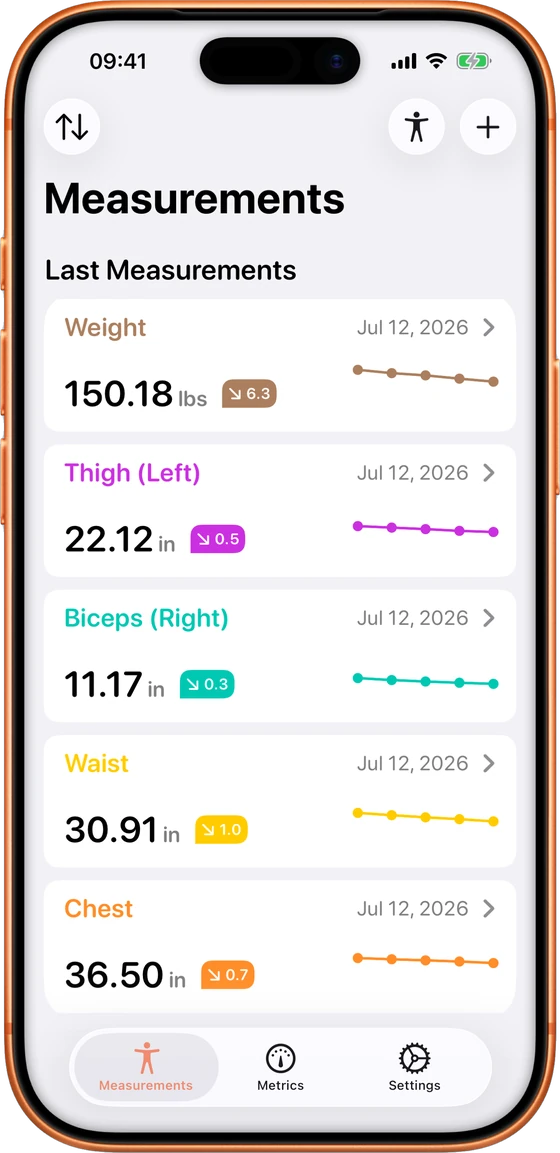
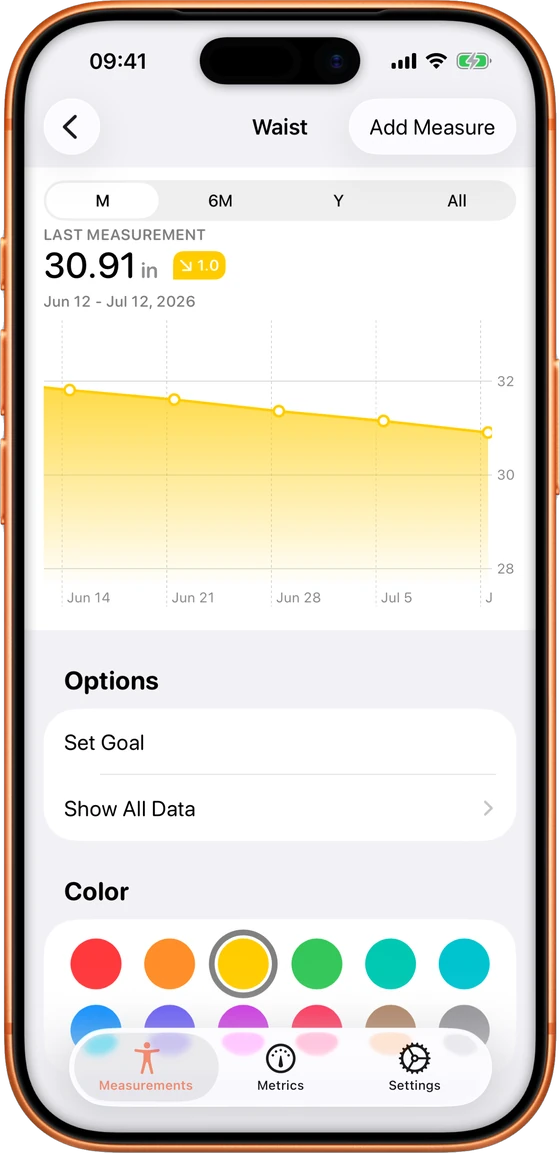
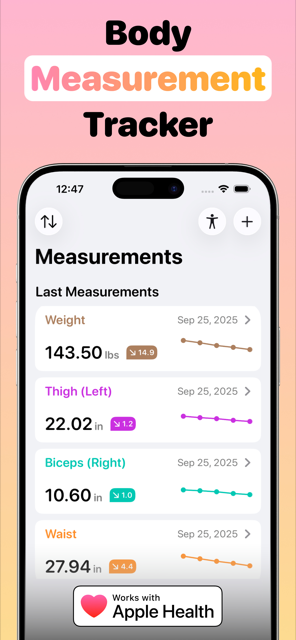
My Body Measurement Tracker app dashboard showing weight, thigh, biceps, waist and chest measurements with 30-day trends Waist measurement progress chart in My Body Measurement Tracker with goal setting and colour options
Inside the app

Everything You Need to Track Your Transformation

From the first measurement to the day you hit your goal — log it, chart it, and watch the trend move.

Body measurement tracker dashboard with last measurements and trends
All your measurements at a glance
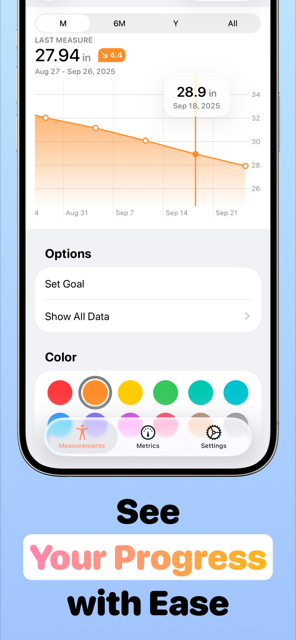
Waist measurement progress chart with goal setting over one month
See your progress with ease
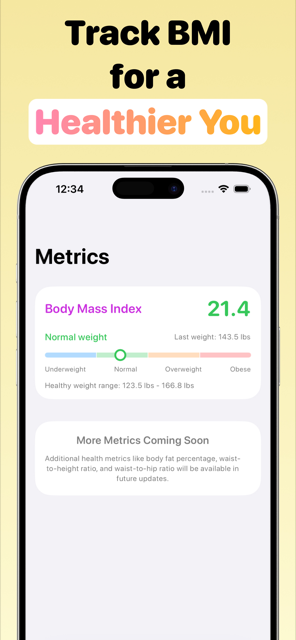
BMI tracker showing body mass index of 21.4 in the normal weight range
Track BMI for a healthier you
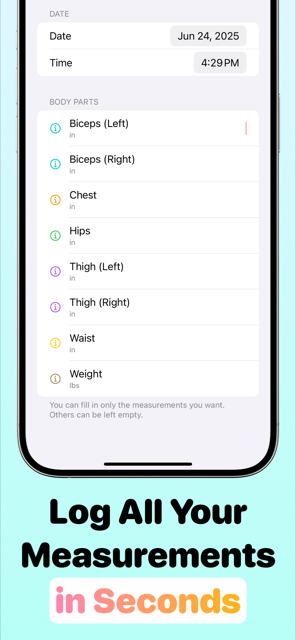
Logging biceps, chest, hips, thigh, waist and weight measurements in one entry
Log all your measurements in seconds
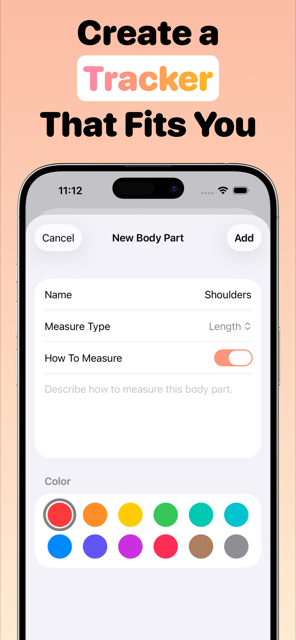
Creating a custom body part tracker for shoulders with colour options
Create a tracker that fits you
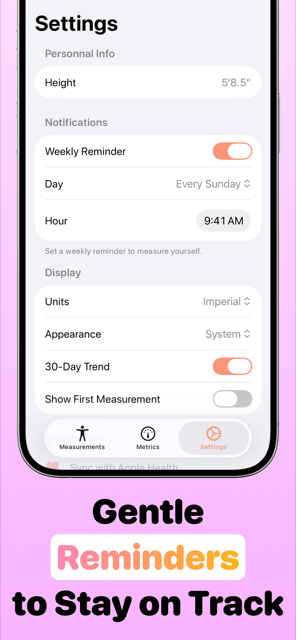
Weekly measurement reminder settings with units and appearance options
Gentle reminders to stay on track
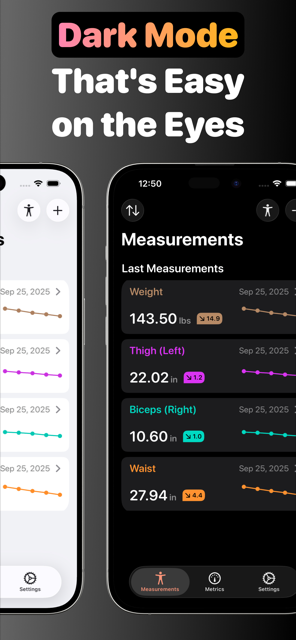
Body measurement tracker in dark mode showing measurement list
Dark mode that's easy on the eyes
Features

Built for Consistency, Designed for Motivation

Track Every Body Part

Weight, waist, hips, chest, biceps, thighs, calves, forearms — left and right tracked separately. Add custom body parts with Pro.

Progress Charts & Trends

Interactive charts across month, 6-month, year and all-time views, plus 30-day and all-time trend deltas for every measurement.

BMI Calculator Built In

Your Body Mass Index updates automatically with every weigh-in, with your healthy weight range clearly displayed.

Set Goals

Aim for a target waist size or bicep measurement and watch the chart close the gap, whether you're cutting, bulking or maintaining.

Weekly Reminders

Pick a day and time — the app nudges you to measure, so your data stays consistent without you having to remember.

Apple Health Sync

Weight and waist circumference flow straight into Apple Health on iPhone, keeping your health picture complete.

Step-by-Step Measuring Guides

Never measured before? Built-in instructions show exactly where to place the tape for every body part, so results are accurate and comparable.

Private by Design

No account. No cloud. Your measurements stay on your phone — your data belongs to you, period.

Dark Mode

A beautiful interface in light and dark, with 12 accent colours to personalise every tracker.

How it works

From Tape Measure to Visible Progress in 3 Steps

1

Measure & Log in Seconds

Grab a soft tape measure and follow the app's built-in instructions for each body part. Log several measurements in one entry — date, time, done.

2

Watch Your Trends

Every body part gets its own chart and 30-day trend. Spot real change even when the scale won't move — inches lost never lie.

3

Hit Your Goals

Set a target, get a weekly reminder, and let the chart do the motivating. Weight loss, muscle gain or maintenance — the trend keeps you honest.

Reviews

Loved by Users Worldwide

Real reviews from the App Store — 5.0 stars across the board.

★★★★★
“This is a fantastic tracker! The visual feedback is perfect, and data entry is streamlined. Plus, it sends the waist measurements to Apple Health! Pretty cool!”
— ChrisWRXSTI
★★★★★
“Does exactly what I need. Measure metrics in relation to my body. Allows me to create custom measurements. Interface is intuitive and easy to use. The app is stable and has no bugs I can find so far. Highly recommended!”
— DarthDigBick
★★★★★
“Does exactly what I need it to do, very easy to use! Have been looking for one this simple :)”
— SofiLuan
★★★★★
“Love the simple design and the efficiency of the data visualization! Everything is in one app. Did get the pro version.”
— jtkd974
★★★★★
“It's so helpful to be able to have a simple tracker to hopefully see the improvements that I'm making. Easy to use, easy to track changes.”
— Daisybelle<3
★★★★★
“I made a suggestion to the developer and within weeks it was taken under consideration and implemented. It's refreshing to have an app made by someone who actually cares.”
— Not a happy yak-er

A Personal Invitation

As the creator of My Body Measurement Tracker, I invite you to join me on this journey. Your feedback is invaluable — the latest features were inspired directly by messages from users like you. If you're looking for something specific or have suggestions, don't hesitate to reach out. Together, we can make this app an even more powerful tool for your fitness journey.

Measurement guides

Learn to Measure Like a Pro

Free, practical guides on taking accurate body measurements and turning them into progress you can see.

How to Take Body Measurements

The complete guide to measuring your body accurately — every body part, every landmark.

Read the guide →

How to Measure Your Waist

Find the exact spot, avoid the classic mistakes, and track waist circumference the right way.

Read the guide →

How to Measure Your Hips

Hip measurement made simple, plus what your waist-to-hip ratio says about your health.

Read the guide →

How to Measure Your Chest

Chest and bust measurement for fitness progress — tape placement, breathing and timing.

Read the guide →

How to Measure Your Biceps

Flexed or relaxed? Left and right? How to measure arms so your gains actually show.

Read the guide →

How to Measure Your Thighs

Get a consistent thigh measurement every time — the landmark trick that makes it repeatable.

Read the guide →

Losing Inches but Not Weight?

Why the scale stalls while your clothes fit better — and why that's usually great news.

Read the guide →

How Often Should You Measure?

The ideal measurement schedule for weight loss and muscle gain — and why more isn't better.

Read the guide →

Body Measurement Chart

What to track, in what order, with a ready-to-use chart — on paper or in the app.

Read the guide →

How to Track Your BMI

What BMI really tells you, healthy ranges, and how to watch it move over time.

Read the guide →

How to Track Muscle Growth

Measure gains without a body-fat scale — the tape-measure method bodybuilders swear by.

Read the guide →
FAQ

Body Measurement Tracking, Answered

How do I take body measurements correctly?

Use a soft tape measure on bare skin, keep the tape level and snug (not tight), and always measure the same landmark: waist at the narrowest point of the torso, hips at the widest point of the glutes, chest at nipple line, biceps at the thickest point of the upper arm. Measure at the same time of day, ideally in the morning. The app shows step-by-step instructions for every body part. Learn more →

Where do you measure your waist?

At the narrowest point of your torso — usually just above the belly button, below the rib cage. Stand relaxed, exhale normally, and don't suck in your stomach. Log it each week to see the trend that one-off measurements can't show. Learn more →

How often should you take body measurements?

Every 1–4 weeks. Weekly is the sweet spot for most people: frequent enough to catch trends, spaced enough that real change outweighs daily water fluctuation. Set the app's weekly reminder and never think about it again. Learn more →

Why am I losing inches but not weight?

Most likely body recomposition: you're losing fat and gaining muscle at the same time. Muscle is denser than fat, so the scale stays flat while your measurements shrink. It's exactly why tracking inches beats tracking weight alone. Learn more →

Is there a free app to track body measurements?

Yes — Body Measurement Tracker is free on iPhone and Android. Track up to 5 body parts free with charts, trends and reminders; Pro unlocks unlimited body parts, goals and custom trackers. See all features →

Does Body Measurement Tracker sync with Apple Health?

Yes. On iPhone, your weight and waist circumference sync to Apple Health automatically, so your measurements live alongside your steps, workouts and other health data. See all features →

How do I track my BMI over time?

Enter your height once in Settings, then every weight entry updates your BMI automatically. The Metrics tab shows your BMI on the underweight–normal–overweight–obese gauge, plus your personal healthy weight range. Learn more →

How do I track muscle growth without a body-fat scale?

The tape measure is the classic method: track biceps, chest, shoulders and thighs every 2–4 weeks under identical conditions. Growing measurements with a stable waist = muscle gain. Charts make the trend impossible to miss. Learn more →

Is my measurement data private?

Completely. All data stays on your phone — no account, no cloud upload, no selling your health data. Deleting the app deletes the data. See all features →

What body measurements should I track for weight loss?

Start with weight, waist and hips — these capture the biggest changes during fat loss. Add chest and thighs for the fuller picture. Use a consistent chart or app so numbers are comparable week to week. Learn more →

Start Tracking Your Transformation Today

Free to download. Measurements logged in seconds. Progress you can actually see. Your data never leaves your phone.